> For the complete documentation index, see [llms.txt](https://help.cleverapp.pro/llms.txt). Markdown versions of documentation pages are available by appending `.md` to page URLs; this page is available as [Markdown](https://help.cleverapp.pro/sozdanie-chat-botov-bloki-scenariya/uvedomleniya/blok-otpravit-bystroe-soobshenie.md).

# Блок "Отправить быстрое сообщение"

<figure><img src="/files/SpEMz8xOTSWOFRdxmguB" alt=""><figcaption></figcaption></figure>

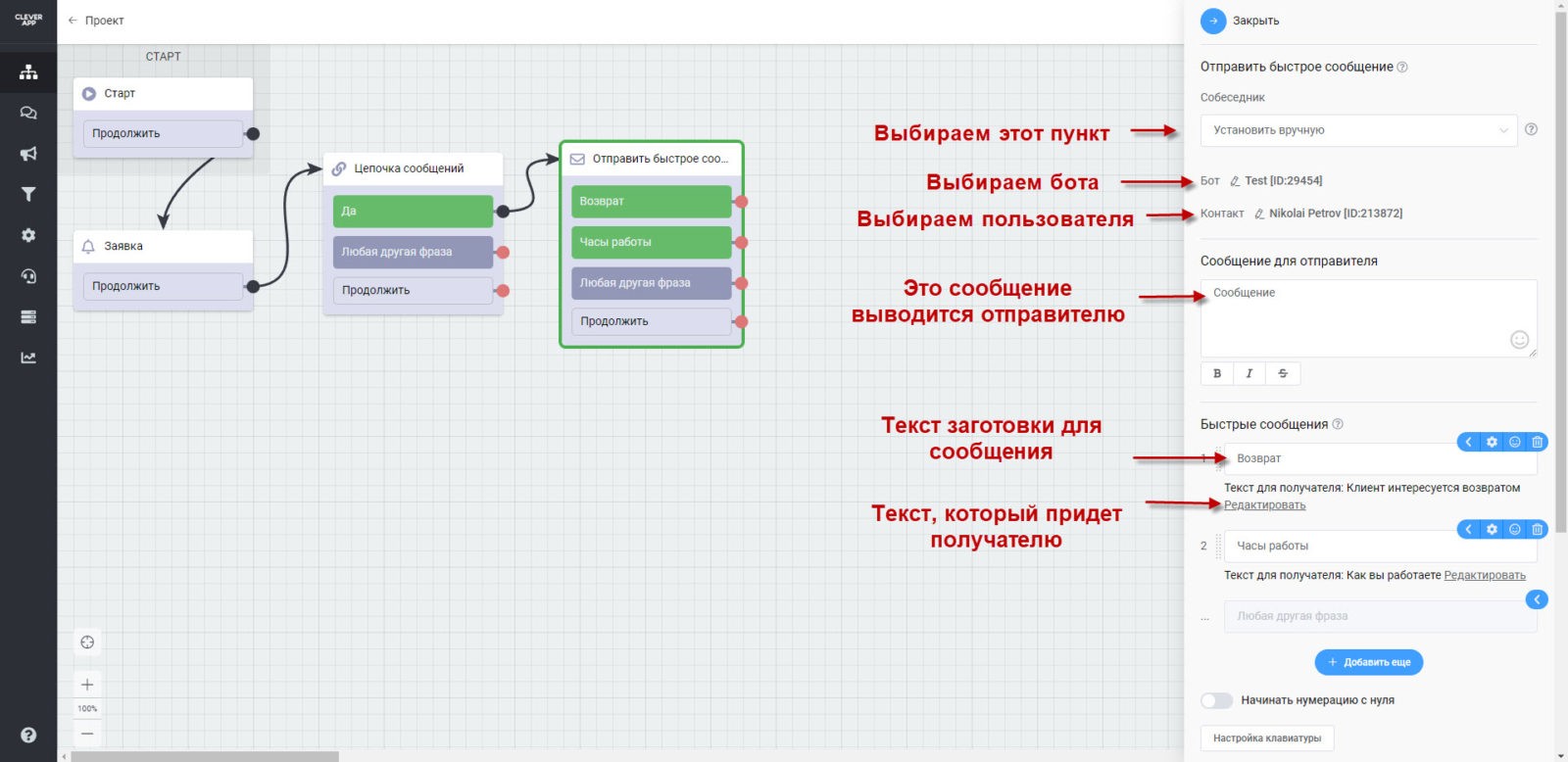
Блок **«Быстрое сообщение» —** отправка сообщения от пользователя бота другому пользователю бота без открытия диалога, в отличие от блока **«Отправить сообщение»**. Например, по нажатию кнопки заранее заданное сообщение отправляется собеседнику.

**Настройки блока “Отправить быстрое сообщение:**

1. В поле “Собеседник” выбираем “Установить вручную”. Про настройку “Получить из предыдущего блока” расскажем ниже
2. В поле “Бот” выбираем бота, подписчиком которого является пользователь, которому должны приходить сообщения
3. В поле “Контакт” выбираем пользователя, которому должны приходить сообщения
4. В поле “Сообщение для отправителя” Вводится текст, которые отправится отправителю перед отправкой “Быстрого (заготовленного) сообщения”
5. В разделе “Быстрые сообщения” задаются заготовленные для отправки сообщения (они же станут кнопками в боте в Телеграм или пунктами меню в WhatsApp), а также задается текст, который придет получателю сообщения.

<figure><img src="/files/RI12tj5ZLmo3zWURqvMd" alt=""><figcaption></figcaption></figure>


---

# Agent Instructions
This documentation is published with GitBook. GitBook is the documentation platform designed so that both humans and AI agents can read, navigate, and reason over technical content effectively. Learn more at gitbook.com.

## Querying This Documentation
If you need additional information that is not directly available in this page, you can query the documentation dynamically by asking a question.

Perform an HTTP GET request on the current page URL with the `ask` query parameter, and the optional `goal` query parameter:

```
GET https://help.cleverapp.pro/sozdanie-chat-botov-bloki-scenariya/uvedomleniya/blok-otpravit-bystroe-soobshenie.md?ask=<question>&goal=<endgoal>
```

`ask` is the immediate question: it should be specific, self-contained, and written in natural language.
`goal` is optional and describes the broader end goal you are ultimately trying to accomplish on behalf of the user. GitBook uses it to tailor the answer towards what is most useful for that goal.

The response will contain a direct answer to the question and relevant excerpts and sources from the documentation.

Use this mechanism when the answer is not explicitly present in the current page, you need clarification or additional context, or you want to retrieve related documentation sections.
