> For the complete documentation index, see [llms.txt](https://help.cleverapp.pro/llms.txt). Markdown versions of documentation pages are available by appending `.md` to page URLs; this page is available as [Markdown](https://help.cleverapp.pro/sozdanie-chat-botov-bloki-scenariya/spiski-i-tablicy/blok-chtenie-zapisei-iz-spiska.md).

# Блок “Чтение записей из списка”

<figure><img src="/files/09odheu06TB4O3m2vGHr" alt=""><figcaption></figcaption></figure>

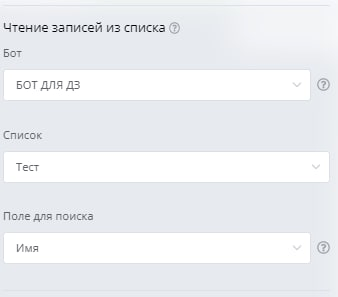
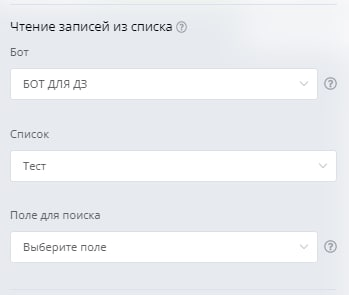
Данный блок позволяет боту отправлять клиенту записи из списка. Для этого в разделе **Сценарий** нажмите **Создать блок** и во вкладке **Эксперт** выберите соответствующий блок

<figure><img src="/files/CGVHTiCugLrKMxdJk8Hb" alt=""><figcaption></figcaption></figure>

Вы можете указать поле для поиска, по которому будет производится поиск по любой другой фразе из предыдущего блока.

<figure><img src="/files/Ixhu26ibx5M6dIZWUcsU" alt=""><figcaption></figcaption></figure>

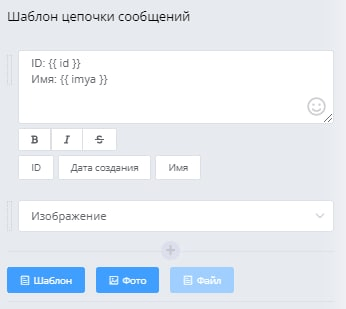
Каждая запись отправляется отдельным сообщением последовательно, кроме того, картинка или файл приходят так же отдельным сообщением. Текстовое сообщение настраивается в виде шаблона, в котором поля списка прописываются в виде переменных, просто нажмите на кнопку ниже с именем нужного поля и оно вставится в текст.

<figure><img src="/files/RDBch2hy7b67cABhNJPN" alt=""><figcaption></figcaption></figure>

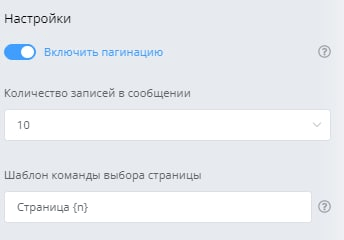
Когда записей много, вы можете включить постраничную навигацию и настроить количество записей для отправки клиенту. Так же вы можете задать произвольный шаблон для выбора страницы, где {n} обозначает номер страницы. Например клиент отправляет боту команду «Страница 2» и бот в ответ присылает еще 10 записей со второй страницы списка.

<figure><img src="/files/glf0r2yD8RccnTBRD0hg" alt=""><figcaption></figcaption></figure>

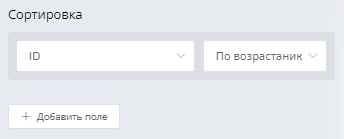
Для настройки сортировки списка вы можете добавить необходимые поля:

<figure><img src="/files/2ytyuZkBztIil4dUV6Hs" alt=""><figcaption></figcaption></figure>

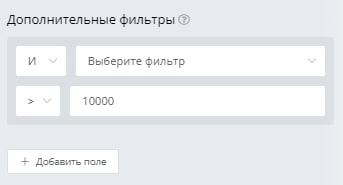
Для установки дополнительных условий выборки данных из списка добавили раздел **Дополнительные фильтры.**

<figure><img src="/files/6eoPTkWBuHa9rXz0NJxi" alt=""><figcaption></figcaption></figure>


---

# Agent Instructions
This documentation is published with GitBook. GitBook is the documentation platform designed so that both humans and AI agents can read, navigate, and reason over technical content effectively. Learn more at gitbook.com.

## Querying This Documentation
If you need additional information that is not directly available in this page, you can query the documentation dynamically by asking a question.

Perform an HTTP GET request on the current page URL with the `ask` query parameter, and the optional `goal` query parameter:

```
GET https://help.cleverapp.pro/sozdanie-chat-botov-bloki-scenariya/spiski-i-tablicy/blok-chtenie-zapisei-iz-spiska.md?ask=<question>&goal=<endgoal>
```

`ask` is the immediate question: it should be specific, self-contained, and written in natural language.
`goal` is optional and describes the broader end goal you are ultimately trying to accomplish on behalf of the user. GitBook uses it to tailor the answer towards what is most useful for that goal.

The response will contain a direct answer to the question and relevant excerpts and sources from the documentation.

Use this mechanism when the answer is not explicitly present in the current page, you need clarification or additional context, or you want to retrieve related documentation sections.