> For the complete documentation index, see [llms.txt](https://help.cleverapp.pro/llms.txt). Markdown versions of documentation pages are available by appending `.md` to page URLs; this page is available as [Markdown](https://help.cleverapp.pro/sozdanie-chat-botov-bloki-scenariya/magazin/blok-spisok-zakazov.md).

# Блок “Список заказов”

<figure><img src="/files/bmr5LQlHxdaDqGKMlSh3" alt=""><figcaption></figcaption></figure>

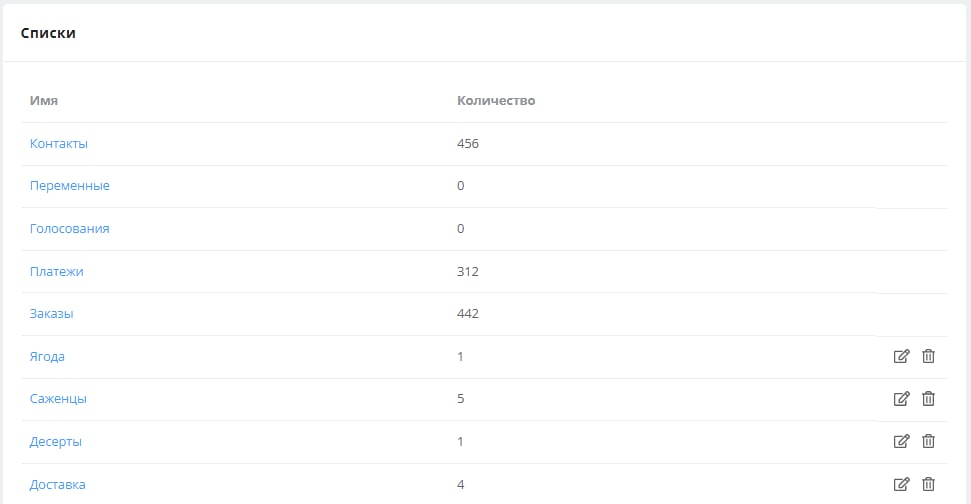
После создания заказа, заявка отобразится в разделе **Ваш бот** → **Списки** →**Заказы.**

<figure><img src="/files/bYfqOmeABIIYpmqSLXut" alt=""><figcaption></figcaption></figure>

<figure><img src="/files/MZNulXY20rrWkXGMM1CN" alt=""><figcaption></figcaption></figure>

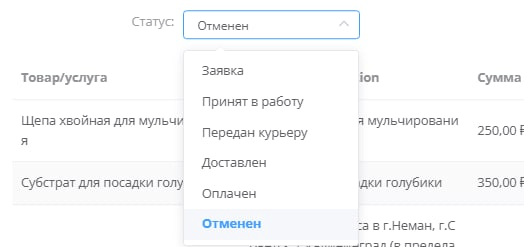
Вы можете открыть детали заказа для просмотра подробной информации, а также вручную изменить статус заказа. После оплаты статус заказа автоматически меняется на «Оплачен».

Поддерживаемые статусы заказа:

<figure><img src="/files/0OKvb4y4x48xuQib744V" alt=""><figcaption></figcaption></figure>

Для того чтобы клиент смог просматривать и оплачивать свои заказы, мы разработали специальный блок «Список заказов».

**Как это выглядит в боте?**

Список заказов отображается в виде кнопок, нажав на которую, можно провалиться в карточку заказа со списком товаров и оплатить товар, если он не оплачен.


---

# Agent Instructions
This documentation is published with GitBook. GitBook is the documentation platform designed so that both humans and AI agents can read, navigate, and reason over technical content effectively. Learn more at gitbook.com.

## Querying This Documentation
If you need additional information that is not directly available in this page, you can query the documentation dynamically by asking a question.

Perform an HTTP GET request on the current page URL with the `ask` query parameter:

```
GET https://help.cleverapp.pro/sozdanie-chat-botov-bloki-scenariya/magazin/blok-spisok-zakazov.md?ask=<question>
```

The question should be specific, self-contained, and written in natural language.
The response will contain a direct answer to the question and relevant excerpts and sources from the documentation.

Use this mechanism when the answer is not explicitly present in the current page, you need clarification or additional context, or you want to retrieve related documentation sections.